I was studying quantum physics
and ended up watching Vim tutorials.
Not once — repeatedly. Add WhatsApp messages pulling you out mid-thought, Instagram reels appearing from nowhere, and YouTube Shorts doing what YouTube Shorts do. The standard fix is to block everything. That doesn’t work when YouTube is also where the best lectures live.
The real constraint
DNS filtering is blunt — block YouTube and you block MIT OpenCourseWare on YouTube too. The problem needed something smarter: block the distraction within the platform, not the platform itself. That’s what drove the entire architecture.
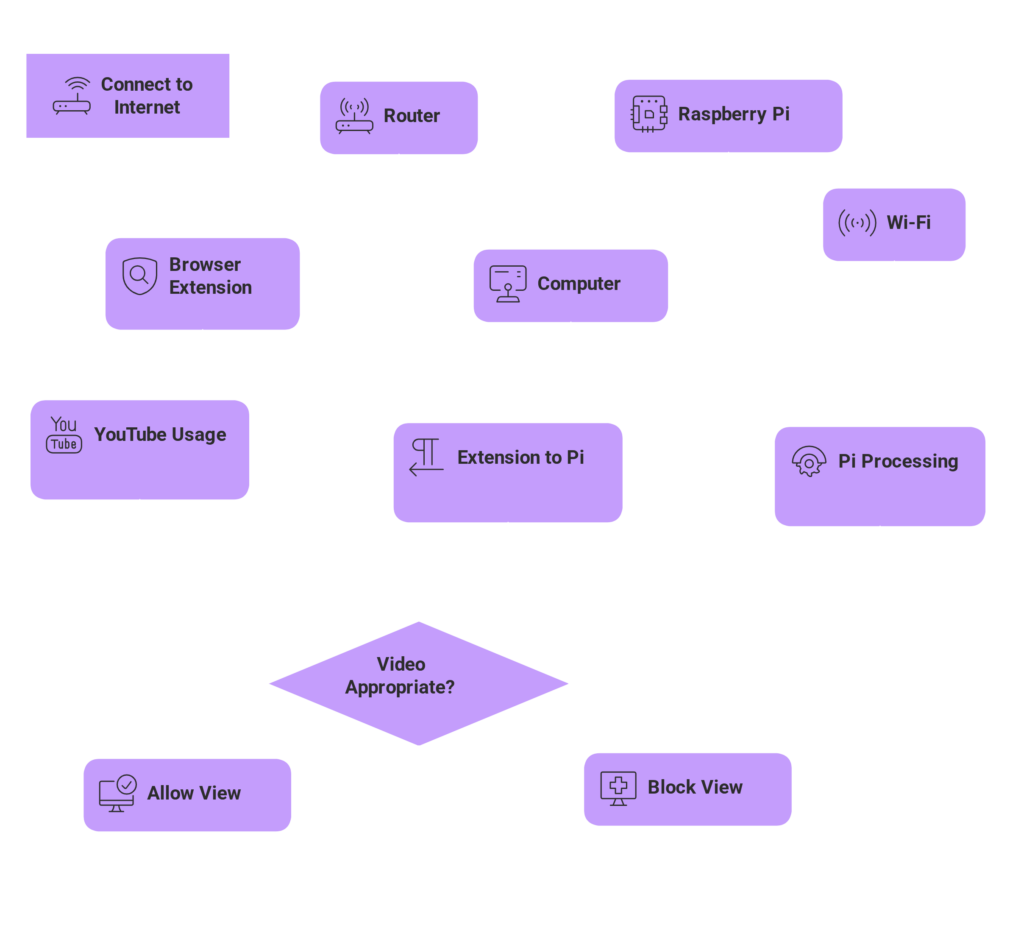
Network layer — DNS blocking
Raspberry Pi sits on the local network as a DNS controller. Instagram, Facebook, WhatsApp — blocked at the network level using curated IP blocklists. No app, no notification, no background ping gets through.
Browser layer — extension intercepts YouTube
When a YouTube video opens, the extension extracts the video ID and sends it to the Pi server over the local network. DNS can’t do this — you need something at the application layer.
Server layer — YouTube API + filtering logic
The Pi queries the YouTube API for video metadata, applies filtering logic, and decides: allow or block. A lecture on quantum mechanics passes. A Vim config video at 11pm during exam prep does not.
Stack
The hackathon — and what happened after
Pitched this at the college hackathon. Lost — the judges weren’t technical enough to evaluate what was actually being built. Standard outcome for infrastructure work in a room judging on presentation.
Two days later, the college approached asking if it could be deployed on the campus network. The judges didn’t get it. The people running the network did.
What this taught
How DNS actually works — not in theory but in practice, including where it breaks down. How network-level and application-level filtering are fundamentally different problems requiring fundamentally different tools. How to make hardware, a server, and a browser extension communicate as a single coherent system.
And that the hardest part of filtering isn’t blocking things — it’s deciding what shouldn’t be blocked.
Status & next
Ran during exams. Shelved since. Next step is a proper configuration UI — so anyone can set it up and tune the filtering logic without touching the code.
for more deeper understanding you can refer this
GitHub link coming soon